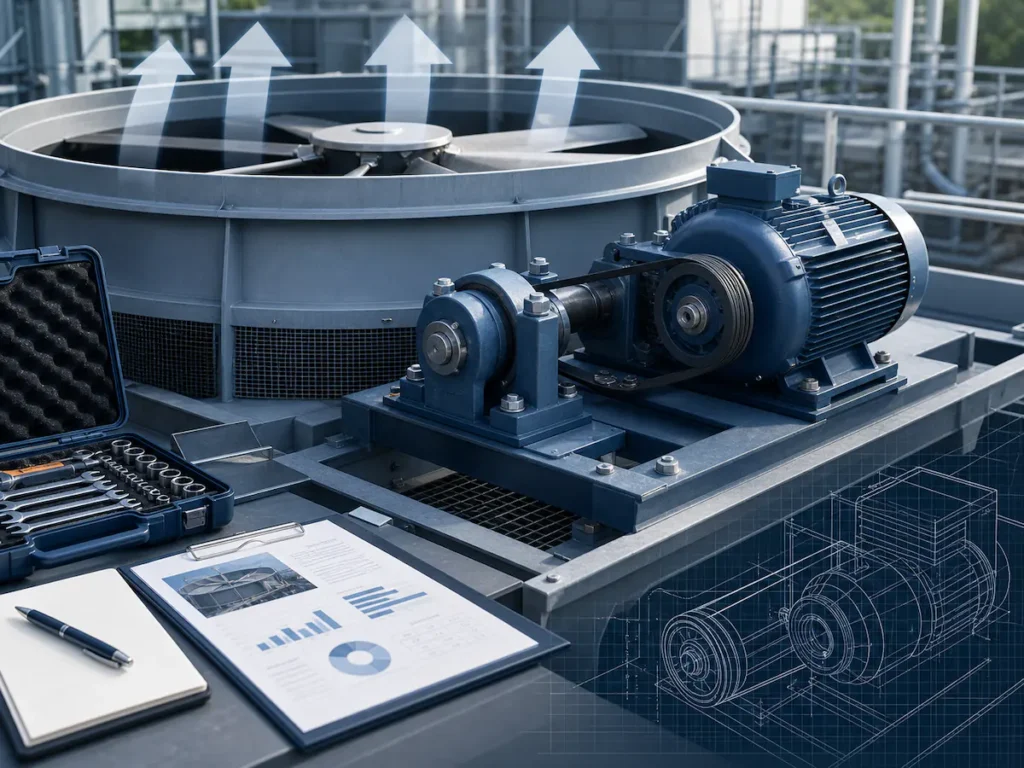
Cooling Tower Fan and Motor Maintenance Guide
The fan and motor system is one of the most important mechanical systems in a cooling tower. It provides the airflow required for heat rejection. If the fan, motor, belt, gearbox, bearings, or drive system does not operate correctly, the cooling tower may lose capacity, consume more energy, generate abnormal noise, vibrate excessively, or fail unexpectedly.
For HVAC systems, data centers, industrial process cooling, injection molding, chemical plants, food and beverage facilities, steel plants, compressor cooling, refrigeration systems, and power applications, fan and motor reliability directly affects cooling tower performance.
A cooling tower may have clean fill, correct water flow, and proper water treatment, but if the fan system cannot deliver enough airflow, the tower will not reject heat effectively.
This guide explains how to inspect, maintain, and troubleshoot cooling tower fans, motors, belts, bearings, gearboxes, vibration systems, and related drive components.
Why Fan and Motor Maintenance Matters
Cooling towers depend on air and water contact to remove heat. The fan system moves air through the tower and supports evaporative heat transfer. When airflow is reduced, cooling performance drops.
Poor fan and motor maintenance can cause:
- Higher outlet water temperature
- Reduced heat rejection capacity
- Higher chiller condenser pressure
- Higher process temperature
- Increased motor amperage
- Higher energy consumption
- Abnormal noise
- Excessive vibration
- Fan blade damage
- Belt slipping
- Gearbox overheating
- Bearing failure
- Motor burnout
- Unexpected shutdown
- Production downtime
- Safety risks
Routine maintenance is much cheaper than emergency repair. A failed fan motor, broken belt, seized bearing, or damaged gearbox can stop an entire cooling tower cell and affect the complete cooling system.
How the Cooling Tower Fan System Works
A cooling tower fan system is designed to move air through the tower. Depending on the cooling tower type, the fan may push or pull air through the heat exchange area.
In most mechanical draft cooling towers, the fan system includes:
- Fan blades
- Fan hub
- Fan stack or fan cylinder
- Electric motor
- Belt drive, gearbox drive, or direct drive
- Fan shaft
- Bearings
- Coupling or drive shaft
- Motor base
- Vibration switch or sensor
- Electrical controls
- VFD or starter
- Protective guards
The fan system works together with the water distribution system, fill, coil, drift eliminators, and tower structure. If one part of the fan system fails, the entire heat rejection process may be affected.
Main Types of Cooling Tower Fan Drive Systems
Cooling towers may use different fan drive systems depending on tower size, capacity, maintenance requirements, noise limits, and design preference.
1. Belt Drive Fan System
A belt drive system uses pulleys and belts to transmit power from the motor to the fan shaft. It is common in smaller and medium-sized cooling towers.
Advantages
- Simple structure
- Lower initial cost
- Easy to replace belts
- Suitable for many package cooling towers
- Flexible speed ratio through pulley selection
Maintenance Concerns
- Belt tension must be checked
- Belt alignment must be maintained
- Belts can stretch over time
- Belts may crack or wear
- Sheaves may corrode or wear
- Belt slip can reduce fan speed
- Bearing lubrication may be required
- Guards must be kept in good condition
Belt drive systems can work reliably when properly maintained, but they require regular inspection.
2. Gearbox Drive Fan System
A gearbox drive system uses a motor, drive shaft, and gearbox to reduce speed and drive a large cooling tower fan. It is commonly used in larger industrial cooling towers.
Advantages
- Suitable for larger fan diameters
- Suitable for higher power applications
- Stable power transmission
- Can support heavy-duty industrial operation
- Common in large multi-cell towers
Maintenance Concerns
- Gearbox oil level must be checked
- Oil condition must be monitored
- Seals must be inspected for leaks
- Bearings must be monitored
- Gear noise should be checked
- Vibration should be measured
- Shaft alignment is important
- Foreign material in oil can damage gears
Improper lubrication, high vibration, misalignment, bearing wear, and oil contamination can lead to gearbox failure.
3. Direct Drive Fan System
A direct drive system connects the motor directly to the fan without belts or gearboxes. It is often used in some modern compact cooling towers, dry coolers, and specific fan designs.
Advantages
- Fewer transmission components
- No belt maintenance
- Reduced mechanical losses
- Compact layout
- Lower routine drive maintenance
- Suitable for VFD control in some applications
Maintenance Concerns
- Motor condition is critical
- Bearings must be monitored
- Fan balance is still important
- Motor heat and electrical conditions must be checked
- Replacement may require specific motor-fan matching
Direct drive systems reduce some maintenance items but do not eliminate the need for inspection.
Main Components to Inspect
A cooling tower fan and motor maintenance program should cover all rotating, electrical, structural, and control components.
| Component | What to Inspect |
| Fan blades | Cracks, corrosion, deposits, pitch, balance, tip clearance |
| Fan hub | Tightness, corrosion, cracks, loose bolts |
| Fan stack | Clearance, damage, deformation, air leakage |
| Motor | Current, voltage, temperature, vibration, bearings, insulation |
| Belt drive | Belt wear, tension, alignment, sheave condition |
| Gearbox | Oil level, oil quality, leaks, noise, temperature, vibration |
| Bearings | Lubrication, noise, temperature, looseness |
| Drive shaft | Alignment, wear, coupling condition, vibration |
| Fasteners | Tightness, corrosion, missing bolts |
| Vibration switch | Function, setpoint, wiring, mounting |
| VFD/starter | Fault codes, speed setting, overload, electrical condition |
| Guards | Secure installation and safe access |
| Motor base | Alignment, corrosion, mounting bolts, vibration |
Safety Before Maintenance
Cooling tower fan and motor maintenance must be performed safely. Fans, motors, belts, and rotating parts can cause serious injury if equipment starts unexpectedly.
Before inspection or repair:
- Shut down the cooling tower cell.
- Follow lockout/tagout procedures.
- Confirm fan and motor cannot start automatically.
- Wait for the fan to stop completely.
- Use proper personal protective equipment.
- Keep hands and tools away from rotating parts.
- Confirm safe access to fan deck or service platform.
- Use fall protection where required.
- Avoid working alone in hazardous areas.
- Follow site safety and electrical safety procedures.
- Do not bypass safety devices.
- Follow the manufacturer’s operation and maintenance manual.
For electrical inspection, qualified electrical personnel should check voltage, current, wiring, insulation, VFD, and control panels.
Daily Inspection
Daily checks are simple but important. They help operators detect abnormal conditions before they become failures.
Daily Fan and Motor Checklist
- Check whether the fan is running normally.
- Listen for abnormal noise.
- Look for excessive vibration.
- Check whether the motor starts and stops normally.
- Confirm fan speed or VFD status.
- Check motor current if available.
- Check cooling tower outlet water temperature.
- Check for visible fan stack vibration.
- Check if the vibration switch has tripped.
- Check for abnormal airflow.
- Check if the fan is cycling too frequently.
- Check for unusual smell from motor or electrical panel.
- Check alarm history.
Warning Signs
Immediate attention is needed if you observe:
- Loud grinding noise
- Sudden vibration increase
- Fan not rotating
- Fan rotating in the wrong direction
- Burning smell
- Motor overheating
- Frequent overload trips
- Loose or broken belt
- Oil leakage
- Fan blade contact with fan stack
- Vibration switch trip
Weekly Inspection
Weekly inspection should include basic visual and operational checks.
Weekly Checklist
- Inspect fan blades visually from a safe location.
- Check for dirt, scale, or deposits on fan blades.
- Check belt guard condition.
- Inspect motor base and mounting bolts.
- Check for visible oil leakage from gearbox.
- Check for abnormal motor temperature.
- Check for unusual fan cycling.
- Check fan stack and support structure.
- Inspect vibration switch condition.
- Review fan runtime and alarm history.
- Check if tower performance has changed.
Weekly inspection is especially important during peak cooling season or continuous industrial operation.
Monthly Inspection
Monthly inspection should be more detailed and should include the mechanical drive system.
Monthly Checklist
- Inspect fan blades for cracks, corrosion, and damage.
- Check fan hub and blade bolts.
- Inspect motor exterior and cooling fins.
- Clean motor surface if needed.
- Check belt condition if belt drive is used.
- Check belt tension and alignment.
- Inspect sheaves and pulleys.
- Check bearing condition.
- Check gearbox oil level if gearbox drive is used.
- Inspect gearbox seals for leakage.
- Check drive shaft condition.
- Check motor amperage and voltage.
- Check VFD fault history.
- Inspect wiring and cable glands.
- Check fan vibration and noise.
- Verify vibration switch operation if required.
- Confirm all guards are secure.
Quarterly Inspection
Quarterly inspection should focus on alignment, vibration, blade condition, and mechanical reliability.
Quarterly Checklist
- Check belt alignment and tension.
- Check fan blade pitch angle.
- Check fan blade tip clearance.
- Inspect fan blades for cracks or missing balance weights.
- Check fan hub tightness.
- Check bearing lubrication condition.
- Check drive shaft alignment.
- Check gearbox mounting bolts.
- Check motor alignment.
- Check motor mounting bolts.
- Inspect vibration switch or sensor.
- Check for abnormal structural vibration.
- Inspect fan stack clearance.
- Check fan blade tracking.
- Check motor current under operating load.
- Review cooling performance trend.
Quarterly maintenance is important because fan blade pitch, belt tension, and alignment can change over time due to wear, vibration, thermal expansion, and operating load.
Semi-Annual Inspection
Semi-annual inspection should include deeper mechanical review and seasonal preparation.
Semi-Annual Checklist
- Check gearbox oil condition.
- Replace oil if required by maintenance schedule.
- Inspect bearings and seals.
- Check coupling and drive shaft wear.
- Inspect all fan assembly fasteners.
- Check motor insulation resistance if required.
- Inspect electrical connections.
- Clean motor ventilation path.
- Inspect corrosion on fan system components.
- Check all guards and access panels.
- Review VFD settings and fan control logic.
- Check tower operation before peak season.
- Review spare parts inventory.
Semi-annual inspection is especially useful before summer peak load or before restarting seasonal cooling systems.
Annual Inspection
Annual maintenance should be a complete mechanical and electrical review.
Annual Checklist
- Inspect all fan blades carefully.
- Check fan balance.
- Check blade pitch uniformity.
- Check blade tip clearance.
- Inspect fan hub and hardware.
- Inspect motor bearings.
- Lubricate bearings according to manufacturer instructions.
- Check motor insulation and winding condition.
- Check electrical terminals.
- Inspect belt drive or gearbox drive.
- Replace worn belts if required.
- Check sheaves and bushings.
- Inspect gearbox oil and internal condition if needed.
- Check alignment of motor, shaft, and gearbox.
- Verify vibration switch operation.
- Check all structural supports.
- Inspect corrosion and coating damage.
- Review maintenance records.
- Update replacement plan for critical parts.
For critical industrial cooling systems, vibration analysis, oil analysis, thermography, and electrical testing may be included in the annual maintenance program.
Fan Blade Maintenance
Fan blades move air through the cooling tower. Any blade damage, imbalance, incorrect pitch, or poor clearance can reduce airflow and increase vibration.
What to Check
- Cracks
- Corrosion
- Erosion
- Scale or dirt deposits
- Loose blade bolts
- Missing balance weights
- Blade deformation
- Uneven blade pitch
- Tip clearance
- Blade tracking
- Fan stack contact marks
- Hub condition
- Unusual noise during operation
Why Fan Blade Pitch Matters
Fan blade pitch affects airflow and motor load. If the pitch angle is too low, airflow may be insufficient. If the pitch angle is too high, the motor may overload and energy consumption may increase.
All blades should have consistent pitch according to manufacturer specifications.
Why Tip Clearance Matters
Tip clearance is the gap between the fan blade tip and the fan cylinder or fan stack. If the clearance is too small, the blade may rub against the fan stack. If it is too large or uneven, air may bypass the blade tips and fan efficiency may drop.
Corrective Actions
- Clean fan blades.
- Tighten blade bolts.
- Adjust blade pitch.
- Correct tip clearance.
- Replace cracked or damaged blades.
- Balance the fan assembly.
- Repair or replace the fan stack if deformed.
- Follow manufacturer specifications for blade adjustment.
Motor Maintenance
The electric motor provides power to the cooling tower fan. Motor failure can stop airflow and reduce cooling capacity immediately.
What to Check
- Motor current
- Supply voltage
- Phase balance
- Motor temperature
- Bearing noise
- Bearing lubrication
- Vibration
- Insulation resistance
- Terminal connections
- Cable condition
- Motor mounting bolts
- Motor alignment
- Grounding
- Overload protection
- VFD status
- Starter condition
- Cooling air path
Common Motor Problems
- Overheating
- Bearing failure
- Winding insulation damage
- Overload trip
- Phase loss
- Voltage imbalance
- Moisture ingress
- Loose electrical connections
- Excessive vibration
- Fan load too high
- Motor shaft misalignment
- Frequent start-stop cycling
Motor Overheating Causes
A fan motor may overheat due to:
- High fan blade pitch
- Mechanical overload
- Bearing friction
- Belt too tight
- Poor ventilation
- High ambient temperature
- Electrical imbalance
- Low or high voltage
- VFD setting issue
- Frequent starting
- Motor aging
- Wrong motor selection
Corrective Actions
- Measure motor current and voltage.
- Compare current with nameplate rating.
- Check bearing condition.
- Clean motor cooling surfaces.
- Check motor ventilation.
- Adjust fan blade pitch if overloaded.
- Correct belt tension.
- Check VFD and starter settings.
- Repair loose electrical connections.
- Replace motor if winding or bearing damage is severe.
Belt Drive Maintenance
Belt drives are common in many cooling towers. A loose, worn, cracked, or misaligned belt can reduce fan speed and cooling performance.
What to Check
- Belt tension
- Belt alignment
- Belt cracks
- Belt glazing
- Belt stretching
- Belt dust
- Uneven belt wear
- Sheave groove wear
- Pulley alignment
- Bushing tightness
- Belt guard condition
- Fan shaft bearing condition
Symptoms of Belt Problems
- Fan speed is lower than expected.
- Belt squealing noise appears during startup.
- Belt dust is visible inside the guard.
- Motor runs but fan does not reach full speed.
- Cooling performance drops.
- Belt slips during high load.
- Belt breaks frequently.
- Vibration increases.
Corrective Actions
- Adjust belt tension.
- Align sheaves properly.
- Replace worn belts.
- Replace worn sheaves.
- Tighten bushings.
- Avoid over-tightening belts.
- Check fan shaft bearing condition.
- Recheck belt tension after initial operation.
- Keep belt guards properly installed.
Over-tightened belts can damage bearings and motor shafts. Loose belts can slip and reduce airflow. Correct tension is essential.
Gearbox Maintenance
Large cooling towers often use gearbox drive systems. Gearbox failure can cause major downtime, so lubrication and vibration monitoring are important.
What to Check
- Gearbox oil level
- Oil color and clarity
- Oil contamination
- Oil leaks
- Seal condition
- Gearbox temperature
- Bearing noise
- Gear noise
- Mounting bolts
- Drive shaft alignment
- Coupling condition
- Backlash if applicable
- Vibration level
- Oil change interval
Common Gearbox Problems
- Low oil level
- Oil contamination
- Water in oil
- Metal particles in oil
- Seal leakage
- Bearing wear
- Gear tooth wear
- Misalignment
- Excessive vibration
- Overheating
- Loose mounting bolts
- Poor lubrication practice
Corrective Actions
- Maintain correct oil level.
- Use recommended lubricant.
- Replace oil according to schedule.
- Repair leaking seals.
- Check for oil contamination.
- Perform oil analysis if needed.
- Tighten mounting bolts.
- Align drive shaft.
- Monitor vibration.
- Repair or replace gearbox before catastrophic failure.
Bearing Maintenance
Bearings support rotating components such as fan shafts, motors, and drive assemblies. Bearing failure is a common cause of noise, vibration, overheating, and fan downtime.
What to Check
- Bearing noise
- Bearing temperature
- Lubrication condition
- Grease or oil level
- Seal condition
- Shaft looseness
- Vibration
- Rust or contamination
- Housing tightness
- Alignment
Signs of Bearing Failure
- Grinding noise
- Whining noise
- Excessive vibration
- High bearing temperature
- Grease leakage
- Metal particles
- Shaft movement
- Fan wobble
- Motor overload
- Repeated belt wear
Corrective Actions
- Lubricate bearings according to manufacturer instructions.
- Do not over-grease bearings.
- Use the correct lubricant.
- Replace damaged bearings.
- Correct shaft alignment.
- Protect bearings from water and contamination.
- Monitor vibration trend.
- Replace seals if needed.
Vibration Monitoring
Vibration is one of the most important warning signs in cooling tower fan systems. Excessive vibration can damage fan blades, motor bearings, gearboxes, drive shafts, fasteners, and structural supports.
Common Causes of Cooling Tower Fan Vibration
- Fan blade imbalance
- Dirt buildup on blades
- Loose blade bolts
- Cracked fan blade
- Uneven blade pitch
- Improper tip clearance
- Belt misalignment
- Drive shaft misalignment
- Gearbox bearing wear
- Motor bearing wear
- Loose mounting bolts
- Fan stack deformation
- Structural looseness
- Foreign object contact
- Airflow turbulence
What to Monitor
- Fan vibration
- Motor vibration
- Gearbox vibration
- Bearing vibration
- Axial movement
- Horizontal vibration
- Vertical vibration
- Changes in vibration trend
- Vibration switch trips
- Abnormal noise
Corrective Actions
- Stop the fan if vibration is severe.
- Inspect fan blades and hub.
- Check all bolts.
- Check belt and sheave alignment.
- Inspect gearbox and motor bearings.
- Check drive shaft alignment.
- Clean fan blades.
- Balance the fan.
- Verify blade pitch and clearance.
- Repair structural looseness.
- Use vibration monitoring for critical towers.
Electrical Control and VFD Maintenance
Many cooling towers use starters, control panels, or variable frequency drives to control fan operation. Electrical problems can cause poor airflow, frequent trips, motor overheating, or unstable fan speed.
What to Check
- VFD fault codes
- Starter condition
- Overload setting
- Motor current
- Voltage balance
- Phase loss protection
- Control wiring
- Cable glands
- Terminal tightness
- Grounding
- Fan staging logic
- Temperature control sequence
- Vibration switch wiring
- Emergency stop circuit
- Motor insulation condition
Common Electrical Problems
- Overcurrent fault
- Phase loss
- Voltage imbalance
- Loose terminals
- Moisture in control panel
- Incorrect VFD ramp settings
- Motor overload trip
- Control signal failure
- Sensor error
- Fan cycling too frequently
Corrective Actions
- Check and record VFD faults.
- Tighten electrical terminals.
- Check motor current under load.
- Confirm overload settings.
- Check control logic.
- Protect panels from moisture.
- Inspect cables and glands.
- Calibrate temperature sensors.
- Review fan staging settings.
- Ask qualified personnel to perform electrical testing.
Fan Direction and Airflow Problems
A fan may run but still fail to deliver proper airflow. One common reason is incorrect rotation direction, especially after electrical work or motor replacement.
What to Check
- Fan rotation direction
- Airflow direction
- Fan speed
- Blade pitch
- Motor wiring
- VFD output direction
- Air inlet blockage
- Drift eliminator blockage
- Fan stack clearance
- Hot air recirculation
Symptoms of Airflow Problems
- Tower outlet water temperature is high.
- Fan is running but airflow feels weak.
- Motor current is abnormal.
- Tower performance suddenly drops after maintenance.
- Fan noise changes.
- Air is moving in the wrong direction.
- Warm discharge air returns to the inlet.
Corrective Actions
- Correct motor phase sequence.
- Verify fan rotation after maintenance.
- Check airflow direction.
- Adjust blade pitch if needed.
- Remove airflow restrictions.
- Clean drift eliminators and louvers.
- Prevent hot air recirculation.
- Confirm fan speed and VFD settings.
Common Cooling Tower Fan and Motor Problems
| Problem | Possible Cause | Corrective Action |
| Fan does not start | Power fault, motor failure, VFD fault, overload trip | Check power supply, VFD, overload, motor |
| Fan starts then trips | Motor overload, high blade pitch, bearing issue, electrical fault | Check current, bearings, fan load, VFD settings |
| Abnormal vibration | Imbalance, loose bolts, blade damage, misalignment | Inspect fan blades, hub, shaft, gearbox, bearings |
| Loud noise | Bearing failure, belt slip, gearbox issue, blade contact | Stop and inspect mechanical components |
| Low airflow | Wrong rotation, low fan speed, belt slip, blocked inlet | Check rotation, belt, fan speed, airflow path |
| Motor overheating | Overload, poor ventilation, bearing friction, voltage issue | Check current, voltage, bearing, cooling surfaces |
| Belt squealing | Loose belt, misalignment, worn sheave | Adjust tension, align sheaves, replace belt |
| Gearbox overheating | Low oil, wrong lubricant, bearing wear, overload | Check oil, temperature, vibration, alignment |
| Vibration switch trips | Excessive vibration, loose structure, fan imbalance | Inspect fan system before restarting |
| Cooling capacity drops | Low airflow, fan speed issue, dirty fill, high heat load | Check fan, motor, fill, water flow, heat load |
Troubleshooting: Fan Not Running
If the cooling tower fan is not running, check both electrical and mechanical causes.
Possible Causes
- Power supply failure
- Blown fuse
- Tripped overload
- VFD fault
- Starter failure
- Motor winding failure
- Phase loss
- Control signal problem
- Vibration switch trip
- Emergency stop activated
- Broken belt
- Jammed fan
- Seized bearing
- Gearbox locked
- Foreign object in fan stack
Troubleshooting Steps
- Confirm power supply.
- Check control panel alarms.
- Check VFD or starter fault codes.
- Check overload relay.
- Check emergency stop and safety interlocks.
- Verify vibration switch status.
- Check if the fan can rotate freely by hand after lockout.
- Inspect belts, gearbox, bearings, and fan blades.
- Check motor winding and insulation if needed.
- Repair the root cause before restarting.
Troubleshooting: Fan Vibration
If the fan vibrates, do not ignore it. Vibration can quickly damage the fan assembly and tower structure.
Possible Causes
- Dirty fan blades
- Blade imbalance
- Loose bolts
- Cracked blade
- Uneven blade pitch
- Belt misalignment
- Shaft misalignment
- Gearbox wear
- Motor bearing wear
- Fan stack contact
- Structural looseness
- Foreign object damage
Troubleshooting Steps
- Stop the fan if vibration is severe.
- Lock out the equipment.
- Inspect fan blades.
- Check blade bolts and hub.
- Check fan stack clearance.
- Check belts, sheaves, and alignment.
- Inspect gearbox and motor bearings.
- Check shaft and coupling.
- Perform vibration analysis if needed.
- Balance or replace damaged components.
Troubleshooting: Motor Overheating
Motor overheating is a serious warning sign. It may lead to insulation failure, bearing damage, or motor burnout.
Possible Causes
- Motor overload
- Incorrect fan blade pitch
- Belt too tight
- Bearing friction
- Poor ventilation
- High ambient temperature
- Voltage imbalance
- Phase loss
- Frequent starting
- VFD setting problem
- Motor aging
- Wrong motor size
Troubleshooting Steps
- Measure motor current.
- Compare current with nameplate rating.
- Check voltage and phase balance.
- Check motor ventilation.
- Inspect bearings.
- Check belt tension.
- Check fan blade pitch.
- Review VFD settings.
- Check fan load and airflow restriction.
- Repair or replace motor if necessary.
Troubleshooting: Belt Slipping or Breaking
Belts are wear parts. If they slip or break frequently, the root cause should be corrected.
Possible Causes
- Incorrect belt tension
- Misaligned sheaves
- Worn pulleys
- Belt aging
- Oil contamination
- Overloaded fan
- Incorrect belt size
- High start-up torque
- Bearing drag
- Poor installation
Corrective Actions
- Install correct belt type and size.
- Align sheaves.
- Adjust tension.
- Replace worn pulleys.
- Keep belts clean and dry.
- Check bearing condition.
- Review fan load.
- Recheck tension after startup.
- Keep spare belts available.
Troubleshooting: Gearbox Noise or Oil Leakage
Gearbox problems should be handled early. Delayed repair can lead to catastrophic failure.
Possible Causes
- Low oil level
- Wrong lubricant
- Oil contamination
- Seal failure
- Bearing wear
- Gear wear
- Misalignment
- Overload
- Loose mounting bolts
- Water entering gearbox
Corrective Actions
- Stop and inspect if noise is severe.
- Check oil level.
- Check oil condition.
- Repair oil leaks.
- Replace oil if contaminated.
- Inspect seals.
- Check vibration.
- Check alignment.
- Tighten mounting bolts.
- Plan gearbox repair or replacement if wear is advanced.
Fan and Motor Maintenance Schedule
| Frequency | Maintenance Tasks |
| Daily | Listen for noise, check vibration, check fan running status, monitor outlet water temperature, review alarms |
| Weekly | Visual inspection, check fan stack, motor exterior, vibration switch, basic performance trend |
| Monthly | Inspect fan blades, motor, belt condition, gearbox oil level, bearings, bolts, VFD status |
| Quarterly | Check belt tension, belt alignment, fan blade pitch, tip clearance, vibration, shaft alignment |
| Semi-Annual | Inspect gearbox oil condition, motor insulation if needed, bearings, coupling, drive shaft, electrical connections |
| Annual | Full fan system inspection, balance check, motor testing, gearbox review, bearing lubrication, replacement planning |
| After Shutdown | Rotate fan by hand, inspect bearings, check belts, check motor, verify controls before restart |
| After Motor or Belt Replacement | Confirm fan rotation, belt tension, motor current, vibration, noise, and operating temperature |
Maintenance After Long Shutdown
Cooling towers that remain idle for a long time should be inspected before restart.
Restart Checklist
- Remove lockout only after inspection is complete.
- Check fan blade condition.
- Turn fan by hand to confirm free movement.
- Inspect motor and wiring.
- Check belt condition and tension.
- Check gearbox oil level.
- Check bearing lubrication.
- Check fan stack clearance.
- Check for nesting, debris, or foreign objects.
- Check vibration switch operation.
- Start fan and observe operation.
- Check motor current.
- Check noise and vibration.
- Recheck after several hours of operation.
Long shutdown can cause corrosion, moisture ingress, belt deformation, bearing issues, and electrical insulation problems.
How Fan Maintenance Affects Cooling Performance
Fan maintenance directly affects heat rejection. If airflow is insufficient, the cooling tower cannot remove heat effectively.
Poor fan performance may cause:
- Higher cold water temperature
- Higher approach
- Higher chiller energy consumption
- Higher process temperature
- Poor production stability
- More frequent system alarms
- Lower cooling capacity
- Increased operating cost
A fan system should be maintained together with water-side components such as fill, nozzles, basin, drift eliminators, coil, and water treatment. Airflow and water flow must work together for stable cooling performance.
Fan and Motor Maintenance for Different Cooling Equipment
THERMOCORE cooling equipment may use different fan and motor configurations depending on product type.
Open Cooling Towers
Open cooling towers rely on fan airflow through fill media. Fan maintenance should be combined with fill inspection, water distribution checks, drift eliminator cleaning, and basin maintenance.
Closed Circuit Cooling Towers
Closed circuit cooling towers use fans to remove heat from the coil and spray water system. Fan performance affects coil heat transfer and process fluid outlet temperature.
Evaporative Condensers
Evaporative condensers depend on fan airflow to support refrigerant condensing. Poor fan performance may increase condensing pressure and reduce refrigeration system efficiency.
Dry Coolers and Air Coolers
Dry coolers rely heavily on fan airflow across finned tube coils. Fan motor maintenance is especially important because there is no evaporative water effect during dry operation. Blocked coils, motor faults, or fan imbalance can directly reduce cooling capacity.
When to Replace Fan and Motor Components
Maintenance can extend service life, but some components must eventually be replaced.
Replace Fan Blades When:
- Cracks are visible
- Blade erosion is severe
- Balance cannot be restored
- Blade deformation affects airflow
- Blade tips are damaged
- Fan stack contact has occurred
- Vibration remains after adjustment
Replace Belts When:
- Cracks appear
- Belt slips after adjustment
- Belt is glazed or hardened
- Belt has stretched excessively
- Belt dust appears frequently
- Belt breaks repeatedly
- Belt has oil contamination
Replace Bearings When:
- Noise increases
- Temperature is high
- Vibration is excessive
- Lubrication does not solve the issue
- Shaft movement is visible
- Bearing seals are damaged
Replace Motor When:
- Windings are damaged
- Insulation resistance is poor
- Motor overheats repeatedly
- Bearing failure is severe
- Motor trips frequently
- Motor current exceeds rating under normal load
- Repair cost is too high
Replace Gearbox When:
- Gear wear is advanced
- Oil contamination repeats
- Bearing wear is severe
- Noise remains after repair
- Vibration is excessive
- Seal failure cannot be controlled
- Gearbox is no longer reliable
Cooling Tower Fan and Motor Maintenance Checklist
Use this checklist for routine fan and motor maintenance.
| Inspection Item | Normal Condition | Action If Abnormal |
| Fan operation | Smooth rotation and stable airflow | Check motor, drive, and controls |
| Fan blades | No cracks, no heavy deposits, balanced | Clean, tighten, balance, or replace |
| Blade pitch | Uniform and within specification | Adjust according to manufacturer data |
| Tip clearance | Uniform and safe | Adjust or repair fan stack |
| Motor current | Within nameplate rating | Check overload, pitch, bearing, voltage |
| Motor temperature | Normal operating range | Check load, ventilation, bearings |
| Motor bearings | Quiet and properly lubricated | Lubricate or replace |
| Belt tension | Correct tension | Adjust or replace belt |
| Belt alignment | Aligned sheaves | Align pulleys and inspect wear |
| Gearbox oil | Correct level and clean | Add, replace, or analyze oil |
| Gearbox seals | No excessive leakage | Repair seals |
| Vibration | Stable and within acceptable range | Inspect fan, drive, bearings, alignment |
| Fasteners | Tight and corrosion-free | Tighten or replace |
| Guards | Secure and complete | Repair before operation |
| VFD/starter | No fault codes | Check electrical system |
| Vibration switch | Functional | Test, reset, or replace if needed |
Common Maintenance Mistakes
Mistake 1: Only Checking the Motor
The motor may be working, but the fan may still underperform due to belt slip, blade pitch, dirty blades, or gearbox problems.
Mistake 2: Ignoring Vibration
Vibration often appears before major mechanical failure. It should be investigated early.
Mistake 3: Over-Tightening Belts
Too much belt tension can damage bearings and motor shafts.
Mistake 4: Adjusting Blade Pitch Without Checking Motor Current
Increasing blade pitch can increase airflow, but it may overload the motor. Motor current must be checked after adjustment.
Mistake 5: Running With Damaged Fan Blades
Damaged blades can create imbalance, vibration, poor airflow, and safety risks.
Mistake 6: Ignoring Gearbox Oil
Low or contaminated oil can cause gear and bearing failure.
Mistake 7: Restarting After a Vibration Trip Without Inspection
A vibration switch trip should be treated as a warning. The root cause should be checked before restarting.
Mistake 8: Not Recording Maintenance Data
Maintenance records help identify trends, repeated failures, and early warning signs.
Information Needed for THERMOCORE Review
If your cooling tower fan or motor system has performance problems, THERMOCORE may need the following information:
| Information Needed | Why It Matters |
| Cooling tower type | Open, closed circuit, evaporative condenser, dry cooler |
| Fan type | Axial fan, centrifugal fan, direct drive, belt drive, gearbox drive |
| Motor power | Helps evaluate load and capacity |
| Fan speed | Affects airflow and cooling performance |
| Motor current | Shows whether motor is overloaded |
| Voltage and frequency | Helps review electrical compatibility |
| VFD or starter type | Affects speed control and protection |
| Fan blade material | FRP, aluminum, steel, or other material |
| Drive type | Belt, gearbox, direct drive |
| Noise or vibration issue | Helps diagnose mechanical problems |
| Cooling performance issue | Links fan condition to tower capacity |
| Heat load | Defines required cooling duty |
| Water flow rate | Helps evaluate overall tower operation |
| Inlet and outlet temperature | Shows cooling performance |
| Wet-bulb temperature | Helps review design condition |
| Photos or videos | Useful for visible damage, vibration, and layout review |
| Installation environment | Dust, humidity, corrosion, rooftop, coastal, chemical site |
| Maintenance history | Shows repeated failures and component age |
THERMOCORE Cooling Tower Fan and Motor Solutions
THERMOCORE designs and manufactures cooling equipment for HVAC, industrial process cooling, refrigeration, data centers, chemical plants, food and beverage, pharmaceutical, petrochemical, power, steel, injection molding, compressor cooling, and plastic processing applications.
Our product range includes:
- Closed Circuit Cooling Towers
- Open Cooling Towers
- Evaporative Condensers
- Dry Coolers and Air Coolers
- Cooling Tower Parts
For cooling tower fan and motor systems, THERMOCORE can provide design support and product configuration based on:
- Cooling capacity
- Airflow requirement
- Fan diameter
- Fan blade material
- Motor power
- Drive system type
- VFD requirement
- Noise limit
- Corrosion resistance
- Maintenance access
- Installation space
- Energy efficiency target
- Application industry
- Site environment
A properly selected fan and motor system improves cooling tower performance, reduces operating risk, and supports long-term reliable operation.
Frequently Asked Questions
Why is cooling tower fan maintenance important?
Cooling tower fan maintenance is important because the fan provides the airflow required for heat rejection. Poor fan performance can increase outlet water temperature, reduce cooling capacity, increase energy consumption, and cause mechanical failure.
How often should cooling tower fans be inspected?
Basic fan operation should be checked daily during operation. More detailed inspections should be performed monthly, quarterly, semi-annually, and annually depending on tower duty, operating hours, and site conditions.
What causes cooling tower fan vibration?
Cooling tower fan vibration may be caused by blade imbalance, dirty blades, loose bolts, cracked blades, uneven blade pitch, belt misalignment, shaft misalignment, gearbox wear, motor bearing problems, or structural looseness.
Why does my cooling tower motor overheat?
A cooling tower motor may overheat due to overload, incorrect fan blade pitch, belt tension problems, bearing friction, poor ventilation, voltage imbalance, phase loss, VFD settings, frequent starting, or motor aging.
How do I know if my cooling tower belt needs replacement?
A belt should be replaced if it is cracked, glazed, stretched, slipping, contaminated with oil, producing belt dust, or breaking repeatedly.
What should be checked on a cooling tower gearbox?
Check gearbox oil level, oil condition, leakage, temperature, noise, vibration, bearing condition, seals, mounting bolts, and drive shaft alignment.
Should fan blade pitch be adjusted during maintenance?
Fan blade pitch should only be adjusted according to manufacturer specifications. After adjustment, motor current, vibration, airflow, and noise should be checked.
What happens if the cooling tower fan rotates in the wrong direction?
Wrong rotation direction can greatly reduce airflow and cooling performance. Fan rotation should always be checked after motor replacement, wiring changes, or VFD work.
Can poor fan maintenance cause a cooling tower not to cool enough?
Yes. Poor fan maintenance can reduce airflow, increase vibration, overload the motor, reduce heat rejection, and cause high outlet water temperature.
What information should I provide for fan and motor selection?
Please provide cooling tower type, heat load, airflow requirement if available, motor power, voltage, frequency, fan diameter, noise limit, drive type, installation environment, and photos of the current fan system.
Request Cooling Tower Fan and Motor Support
Fan and motor maintenance is not only a repair task. It is part of cooling tower performance management. A reliable fan system helps maintain airflow, cooling capacity, energy efficiency, and equipment safety.
To help THERMOCORE review your cooling tower fan and motor requirements, please provide:
- Cooling tower type
- Heat load or cooling capacity
- Water flow rate
- Inlet and outlet water temperature
- Wet-bulb temperature
- Fan type and fan diameter
- Motor power and voltage
- Drive type
- VFD or starter information
- Current fault or maintenance issue
- Photos or videos of fan operation
- Noise or vibration condition
- Installation environment
- Material or corrosion resistance requirement
- Required cooling performance
THERMOCORE can help you review fan and motor configuration, cooling tower airflow design, maintenance access, and suitable cooling tower options for your project.
Request a Cooling Tower Fan and Motor Review